
Backtesting software that runs on your GPU,
tens of thousands of strategies at a time.
The CPU prepares the research job; the GPU generates, backtests and scores in batches.
Windows 10/11, 64-bit. · 7 days, no credit card required
Exports to six platforms: MultiCharts, TradingView, TradeStation, NinjaTrader, MetaTrader 4 and MetaTrader 5
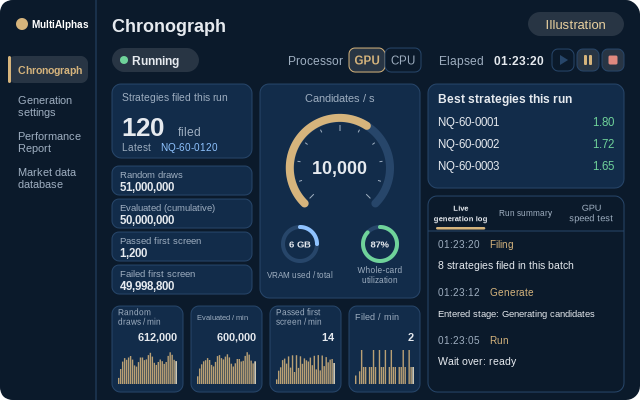
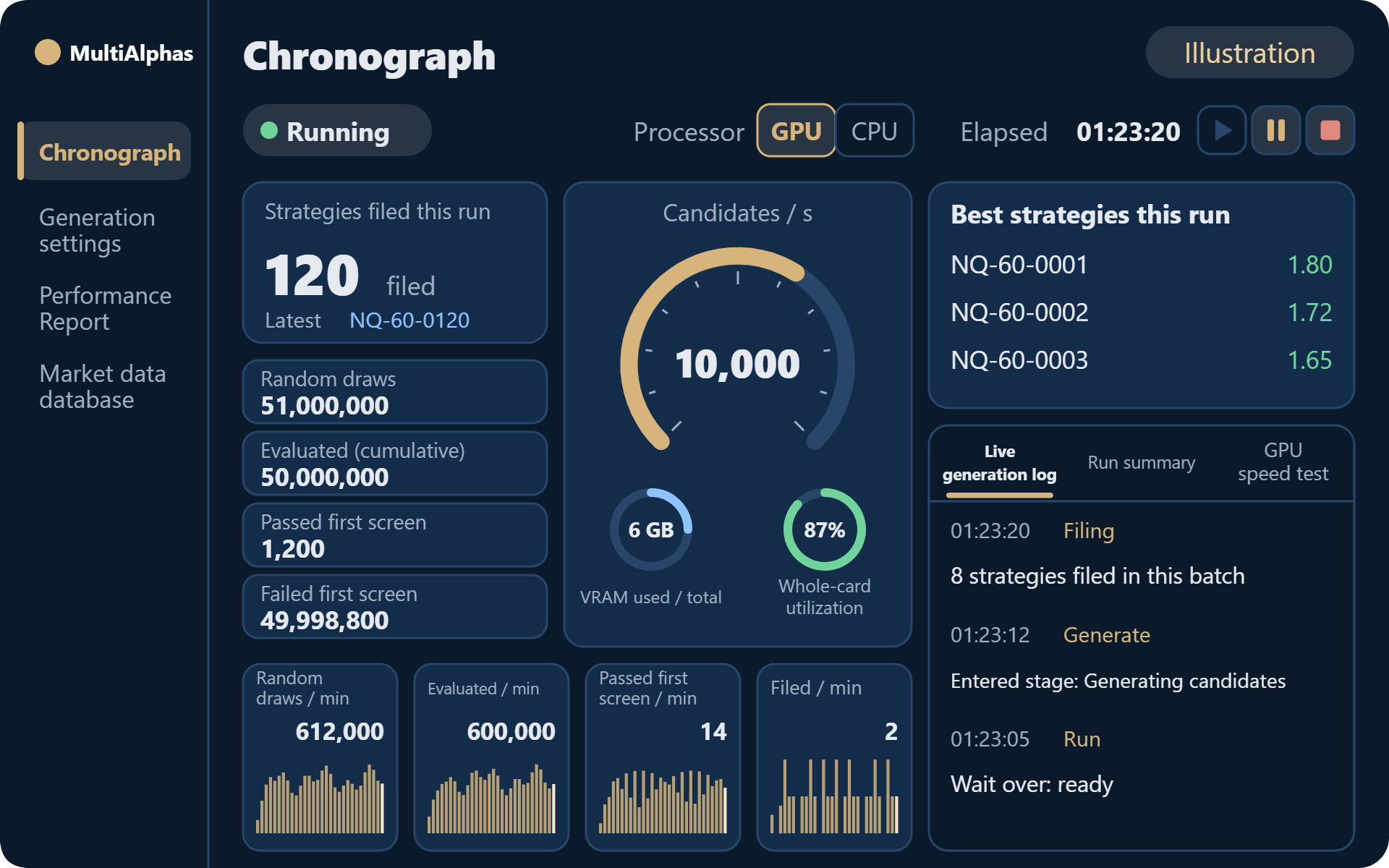
Chronograph
Processor choice, generation speed, the best strategies this run and the generation log.
GPU / CPU
Choose GPU or CPU at the top right of the Chronograph; without an NVIDIA graphics card, choose CPU.
Fees & slippage
Every candidate pays fees and slippage; anything below your thresholds is dropped, so the databank only keeps what is worth a look.
Best strategies this run
“Best strategies this run” lists the strategies currently ranked at the top; every strategy that is kept is in the Strategy databank at the bottom.
Reserve computes on NVIDIA graphics cards Windows 10/11, 64-bit. Classic runs with any graphics card; Reserve needs an NVIDIA GeForce GTX 10 series or newer graphics card with the latest NVIDIA driver.
Classic or Reserve?
Reserve has everything in Classic, plus GPU computing and Workflow. Classic's speed depends on CPU performance. You can upgrade from Classic to Reserve at any time: what you paid counts in full and you pay only the difference.
Why backtesting runs on the GPU
A single backtest is not difficult for most futures backtesting software. What takes time is the validation after a strategy has taken initial shape: reordering the trade sequence hundreds of times, adjusting each parameter slightly up and down, retesting across markets, and rolling walk-forward analysis over ten years of bars. A single strategy generates thousands of additional backtests; multiplied by the number of strategies the generator keeps, validation is often skipped for lack of computing power.
Reserve uses GPU parallel computing to carry the validation load: the CPU schedules the tasks, and the GPU backtests thousands of candidate strategies simultaneously, each including commission and slippage, with fills on the next bar.
Monte Carlo backtesting, robustness testing and walk-forward analysis: one validation queue
Under Generation settings › Strategy validation, set the checks a kept strategy must pass and their order. Placing the faster checks first is recommended (Stress Test, Monte Carlo trades manipulation), followed by the Monte Carlo retest methods, with walk-forward analysis last. Strategies that fail an earlier stage do not proceed to later stages, so GPU computing power is concentrated on the candidates that still qualify.
- Monte Carlo backtesting: trades manipulation operates on the completed trade list; the retest methods rerun the backtest after changing conditions. When interpreting the results, focus on the unfavorable end of the distribution, not the median.
- Robustness testing: Stress Test, Multi-Market Backtest on other instruments, and Parameter CT Scan. Parameter CT Scan backtests every grid point around each parameter to identify whether the parameter sits on a stable plateau or an isolated peak.
- Walk-forward analysis: select parameters on one segment of data, trade on the unseen data that follows, then roll forward. Only strategies that remain profitable on unseen data pass.
- Custom thresholds: a pass criterion can be set for each check; if any check fails, the remaining checks are skipped.
Validation results: one measured run
On 2026-10-15, ES 60-minute bars were run on a mid-range RTX 3060 Ti with default settings, conservative costs and 1 contract. A total of 1,024 strategies were evaluated; 250 passed the basic filters and 126 passed walk-forward analysis. Bars from October 2022 onward were excluded from the database during both generation and walk-forward analysis. On this held-out data, 91% of the strategies that passed walk-forward analysis were profitable, compared with 53% of those that did not.
TAIEX futures with the same settings: 85% versus 66%.
Note that both held-out periods were rising markets (ES rose about 116% and TAIEX futures about 29%), so most long strategies could be profitable regardless of quality. The key point is the gap between the two groups; the 91% figure alone overstates strategy quality.
Practical implications
Validation no longer needs to be rationed. With CPU-based futures backtesting software, a common workflow is to generate overnight and then select only about ten strategies for walk-forward analysis the next day, limited by one night of computing capacity. In MultiAlphas, every kept strategy completes the entire validation queue; every candidate on the list you open has already passed Monte Carlo, Parameter CT Scan and walk-forward analysis.
Validation cannot correct flawed inputs. A strategy with incorrect session settings or with slippage set to zero may pass every check and still lose money in live trading. Confirm first that the cost and session settings are correct.
Classic works with any graphics card and runs on the CPU; Workflow and the GPU speed test are Reserve features. Reserve's GPU mode supports NVIDIA GeForce GTX 10 series or newer graphics cards.
Further reading
Each check is covered in a dedicated article: Monte Carlo backtesting: scope and limitations; Robustness testing explained with futures examples; An overview of walk-forward analysis.
Select a market you trade (starting with ES 60-minute bars is recommended) and run the full validation queue in the free 7-day trial.
Chronograph
Chronograph: processor choice, generation speed, best strategies this run and generation log.
Free 7-day trial